
Affiliate Disclosure: We may earn a commission from affiliate links in this review. However, all opinions are our own, and we only recommend products we believe in.
HubSpot's free chatbot helps small businesses capture leads 24/7 through automated conversations and seamless CRM integration. Unlike Intercom's $39/month starting price or Drift's $2,500/month enterprise focus, HubSpot provides powerful live chat without upfront costs.
Small businesses face a common challenge: missing leads while you're away from your desk. A prospect visits your website at 9 PM. They have questions. Nobody answers. They leave and never come back.
Live chat tools solve this problem, but choosing between HubSpot, Intercom, and Drift isn't straightforward. Each platform targets different business needs and budgets.
HubSpot Chatbot Features for Small Business
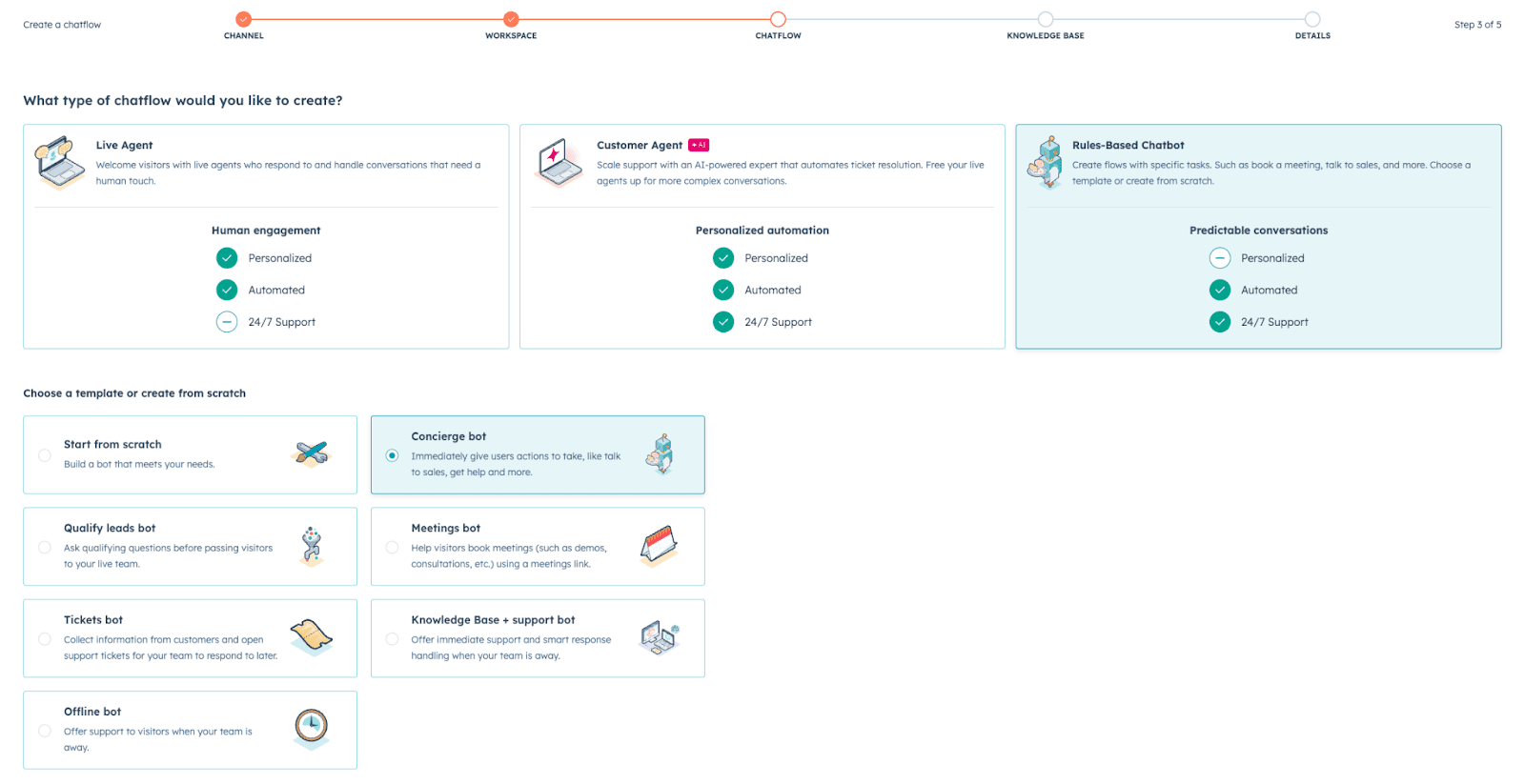
HubSpot's chatbot lives inside the free CRM tier. Zero monthly fees for unlimited conversations.
Core capabilities include:
- Automated welcome messages that greet visitors instantly based on page context or traffic source
- Lead qualification flows using branching logic to route prospects to sales or support
- Meeting scheduling integrated directly into chat conversations without leaving the widget
- CRM sync that automatically creates contact records and logs every conversation
- Team inbox where multiple team members can monitor and respond to chats
The chatbot builder uses a visual drag-and-drop interface. No coding required. You create conversation flows by connecting question blocks with answer paths.
Example workflow: Visitor lands on pricing page → Bot asks "What brings you here today?" → Visitor selects "I want a demo" → Bot books meeting directly through your calendar → Contact record created automatically in CRM with conversation history.
According to HubSpot's research, 90% of customers rate an immediate response as important when they have a customer service question. HubSpot's chatbot delivers that instant engagement without requiring staff availability.
Want to capture leads while you sleep? Get started free with HubSpot.
Intercom Live Chat: What You Get at $39/Month
Intercom positions itself as a customer messaging platform rather than just live chat. Their Essential plan starts at $39 per seat monthly.
Intercom's strengths:
- Product tours that guide users through features with interactive walkthroughs
- In-app messaging for SaaS products to communicate with users inside your application
- Advanced segmentation to target specific user groups with personalized messages
- Resolution Bot that suggests help articles before escalating to human agents
- Custom bots with more complex automation logic than basic chatbots
Intercom excels when you're running a SaaS product and need to message users inside your application. Their product tour feature helps with user onboarding.
However, that $39/month multiplies fast. Five team members accessing Intercom costs $195 monthly ($2,340 annually). The pricing increases with each additional seat and scales up to their Advanced plan at $99 per seat.
Intercom's own data shows that businesses using live chat see a 48% increase in revenue per chat hour. But for small businesses, that ROI calculation must factor in the monthly seat costs.
Drift Conversational Marketing: Enterprise-Level Investment
Drift doesn't publish standard pricing. Their platform targets mid-market and enterprise companies with complex sales cycles. Reported pricing starts around $2,500 monthly for their Premium plan.
Drift's enterprise features:
- Account-based marketing that identifies target accounts and personalizes their chat experience
- Sales acceleration tools connecting website visitors directly to sales reps via video
- Advanced routing based on company size, industry, or account ownership
- Revenue attribution tracking which conversations contribute to closed deals
- Conversational landing pages replacing traditional forms with chat-based lead capture
Drift pioneered conversational marketing. Their platform treats chat as a revenue channel, not just support.
The investment makes sense for companies with high deal values. If your average sale exceeds $50,000 and you're targeting specific enterprise accounts, Drift's ABM capabilities justify the cost.
For small businesses selling lower-ticket offerings? The math doesn't work. You'd need to close multiple deals monthly just to cover the software expense.
HubSpot vs. Intercom vs. Drift: Head-to-Head Comparison
Pricing Structure:
- HubSpot: Free chatbot with unlimited conversations. Paid tiers add automation complexity and reporting.
- Intercom: $39/month per seat minimum. Costs scale with team size.
- Drift: Custom pricing starting around $2,500/month. Enterprise focus.
CRM Integration:
- HubSpot: Native. Chat conversations sync automatically to contact records. No integration setup required.
- Intercom: Requires third-party integrations with Salesforce, HubSpot, or other CRMs. Additional configuration needed.
- Drift: Connects to Salesforce and other CRMs through native integrations. Some data syncing limitations.
Ease of Setup:
- HubSpot: Install tracking code, create first bot in visual builder, publish. 30 minutes to launch.
- Intercom: Similar simplicity for basic chat. Product tours require additional development work.
- Drift: More complex initial configuration, especially for ABM targeting and routing rules.
Best Use Cases:
- HubSpot: Growing businesses, service providers, B2B companies, anyone wanting free CRM plus chat in one platform.
- Intercom: SaaS products needing in-app messaging and product tours. Customer support teams.
- Drift: Enterprise B2B sales teams targeting named accounts. High-value, complex sales cycles.
What HubSpot's Free Chatbot Can't Do
HubSpot's free chatbot handles most small business needs. But understanding limitations prevents disappointment.
Free tier restrictions:
- No advanced automation: Complex workflows with conditional logic require Professional tier.
- Limited reporting: Basic conversation metrics only. Custom dashboards need paid plans.
- No A/B testing: Testing different bot variations requires third-party apps.
- HubSpot branding: Chat widget displays "Powered by HubSpot." Remove branding with Starter tier ($15/month).
- Team permissions: Advanced user permissions require Professional or Enterprise tiers.
The free chatbot provides core functionality: automated greetings, lead capture, meeting booking, CRM integration. Most small businesses don’t need features beyond this in the early stages of growth.
Intercom's $39/month plan also has limitations. Their Resolution Bot (AI-powered article suggestions) costs extra. Advanced segmentation requires their Advanced plan at $99 per seat.
The difference: HubSpot gives you a complete live chat system at $0. Intercom charges a minimum of $39/month for basics, then upsells additional capabilities.
HubSpot Chat Integrations vs. Competitors
Live chat rarely operates in isolation. Integration with your existing tools determines real-world usability.
HubSpot's ecosystem:
- 2,000+ integrations available through HubSpot's App Marketplace
- Gmail and Outlook integration for email context in chat conversations
- Slack notifications when new chats arrive
- Zapier connectivity for custom workflows
- WordPress, Shopify, and major CMS platforms
Because HubSpot's chatbot lives inside the CRM, every conversation automatically connects to contact history, deal stages, and past emails. This context helps team members respond intelligently without asking visitors to repeat themselves.
Intercom offers strong integrations but requires configuration. Connecting Intercom to Salesforce or another CRM involves API setup and field mapping. HubSpot's native CRM eliminates this friction.
Drift integrates well with sales tools like Salesforce and Outreach. However, these integrations assume enterprise budgets and technical resources for implementation.
For small businesses, HubSpot's all-in-one approach means fewer tools to manage. Chat, email, CRM, and marketing automation operate from one platform.
Which Live Chat Tool Should You Choose?
Match the tool to your business model and budget constraints.
Choose HubSpot if:
- You need free live chat with CRM integration
- Your business serves other businesses (B2B)
- You want meeting scheduling built into chat
- You're starting with limited budget and want room to scale
- You value all-in-one platforms over specialized tools
Choose Intercom if:
- You're running a SaaS product needing in-app messaging
- Product tours and user onboarding are priorities
- You have budget for per-seat pricing ($39-$99/month)
- Your team focuses primarily on customer support
- Advanced segmentation matters for your user communication
Choose Drift if:
- You're targeting enterprise accounts (ABM strategy)
- Your average deal value exceeds $50,000
- Sales acceleration justifies premium investment
- You need revenue attribution at the conversation level
- Video chat and instant rep connections drive your sales process
For most small businesses reading this article, HubSpot represents the best starting point. Zero cost removes financial risk. If chat doesn't convert leads for your business, you've invested nothing beyond setup time.
As your needs grow, HubSpot's paid tiers ($15 Starter, $45+ Professional) add automation and reporting.
How to Set Up HubSpot Chatbot in 30 Minutes
Implementation speed matters. Here's the fastest path to live chat on your website.
Step 1: Create free HubSpot account
Visit HubSpot's signup page and register with your business email. No credit card required.
Step 2: Install tracking code
Work through to Settings → Tracking & Analytics → Tracking Code. Copy the JavaScript snippet and paste it before the closing </head> tag on your website. If using WordPress, HubSpot provides a plugin that handles this automatically.
Step 3: Create your first chatbot
Go to Service → Chatflows → Create chatflow. Choose "Website" as the channel. Select "Qualify leads" template or start from scratch.
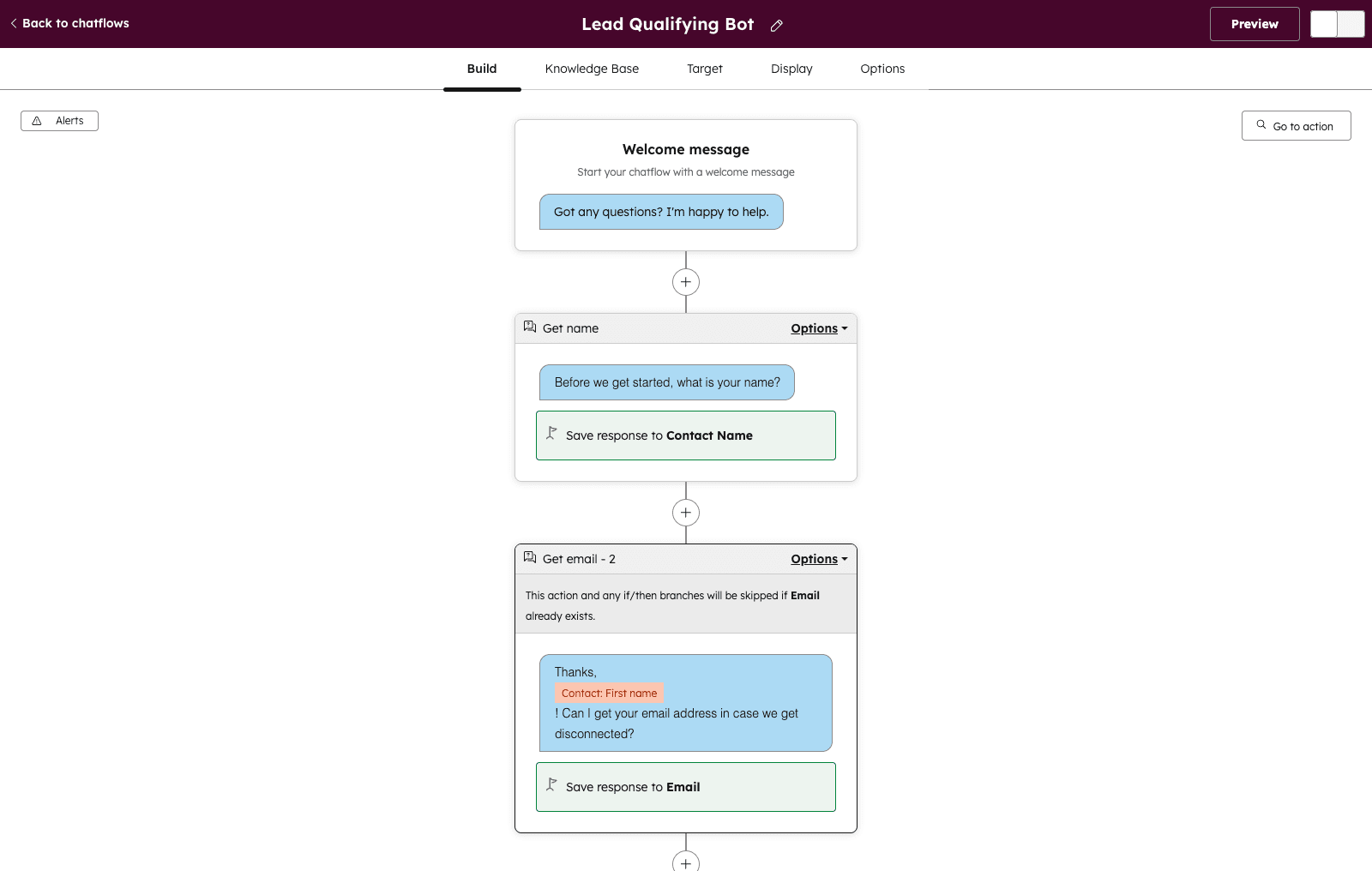
Step 4: Build conversation flow
Add a welcome message: "Hi! Looking for help with [your service]? I can answer questions or schedule a call."
Add quick replies: "Schedule a call" | "Learn more" | "Pricing questions"
Connect meeting link for "Schedule a call" path. Add knowledge base articles for "Learn more." Route "Pricing questions" to your sales team inbox.
Step 5: Configure targeting
Choose which pages display the chatbot. Start with high-intent pages: pricing, services, contact. Avoid showing chat on blog posts initially.
Step 6: Publish and test
Click "Publish" and visit your website. Test the conversation flow yourself. Verify meeting links work. Confirm contact records appear in CRM.
Total time: 25-30 minutes from signup to live chatbot.
Intercom's setup follows similar steps but requires additional CRM integration configuration. Drift's implementation involves more complex targeting rules, especially for ABM deployment.
Frequently Asked Questions
Is HubSpot chatbot really free forever?
Yes, HubSpot's CRM and chatbot remain free with up to 1,000 contacts and unlimited conversations. You'll see "Powered by HubSpot" branding in the chat widget, which you can remove by upgrading to Starter tier at $15/month.
Can I use Intercom if I already have a different CRM?
Yes, Intercom integrates with Salesforce, HubSpot CRM, and other platforms through their App Store or Zapier. However, integration requires configuration and may not sync all fields automatically.
How much does Drift actually cost?
Drift doesn't publish standard pricing. Based on user reports, their Premium plan starts around $2,500 monthly, with Enterprise pricing reaching $5,000+ per month depending on features and user count.
Which chatbot has better mobile experience?
All three platforms offer responsive chat widgets that work on mobile devices. HubSpot and Intercom provide mobile apps for team members to respond to chats on the go. Drift also has mobile apps with video calling capabilities.
Can chatbots replace human customer service?
No. Chatbots excel at initial engagement, qualification, and routing. They handle routine questions and schedule meetings. But complex issues and personalized service still require human interaction. Think of chatbots as your 24/7 first responder, not a complete replacement.
What happens if I outgrow HubSpot's free chatbot?
HubSpot's Starter tier removes branding and adds email sequences. Professional tier adds advanced automation and custom reporting. You can upgrade as needs grow without switching platforms.
Does Intercom work for B2B companies?
Yes, Intercom serves both B2C and B2B companies. Their strength lies in SaaS products where in-app messaging matters. Traditional B2B service businesses often find better value in HubSpot's integrated approach.
Can I use multiple chat tools together?
Technically yes, but this creates confusion. Pick one primary platform for your website chat. Multiple chat widgets slow page load times and split conversation history across platforms.
Final Recommendation: Start with HubSpot
Live chat transforms how small businesses capture leads. But choosing the wrong platform wastes time and money.
HubSpot's free chatbot offers the lowest-risk entry point. You get complete live chat functionality, CRM integration, and meeting scheduling without monthly fees. If chat doesn't generate leads for your business, you've invested nothing but setup time.
Intercom makes sense for SaaS products where in-app messaging and product tours justify the $39+ per seat monthly cost. Their platform excels at customer engagement within software applications.
Drift serves enterprise B2B companies with high deal values and account-based marketing strategies. At $2,500+ monthly, the investment requires substantial revenue justification.
For most small businesses, service providers, and B2B companies, HubSpot represents the smart choice. Start free, prove ROI, then scale with paid features as revenue grows.
Stop missing leads while you're away from your desk. Get started with HubSpot's free chatbot today and start capturing conversations 24/7.